Context Engineering: The Missing Layer in Agentic Applications

In this post from The Agentic Advantage series, we explore one of the most important — and often overlooked — aspects of building AI agents: Context Engineering.
If you're new to agents, check out the previous post here. in the series to learn the basics of building agents.
Why Context Engineering Matters
Building AI agents has become significantly easier thanks to frameworks, SDKs, and ADKs that abstract much of the complexity involved in creating LLM-powered applications.
However, the hardest part of building reliable agentic systems isn't creating the agent itself — it's managing the context.
Unlike traditional chat applications, many AI agents are built to perform specific tasks. These systems often cannot rely on long conversational exchanges to gradually gather context. Instead, the agent must receive all necessary information at the right moment in order to make the correct decision and complete its task.
As AI systems grow in complexity, context becomes the primary engineering challenge.
As Andrej Karpathy said it, LLMs are like a new kind of operating system. The LLM is like the CPU and its context window is like the RAM, serving as the model's working memory.
What Is Context Engineering?
Context Engineering is the practice of designing systems that provide the right information, in the right format, at the right time to help an LLM complete a task.
Context can include:
- System instructions
- User messages
- Retrieved documents
- Tool definitions
- Tool outputs
- Memory
- Skills
- External data
- Messages from other agents
Every LLM has a finite context window (8K, 32K, 128K tokens or more). All the information above must fit inside that window during reasoning.
Our job as AI engineers is to ensure that only the information relevant to the current task occupies that space.
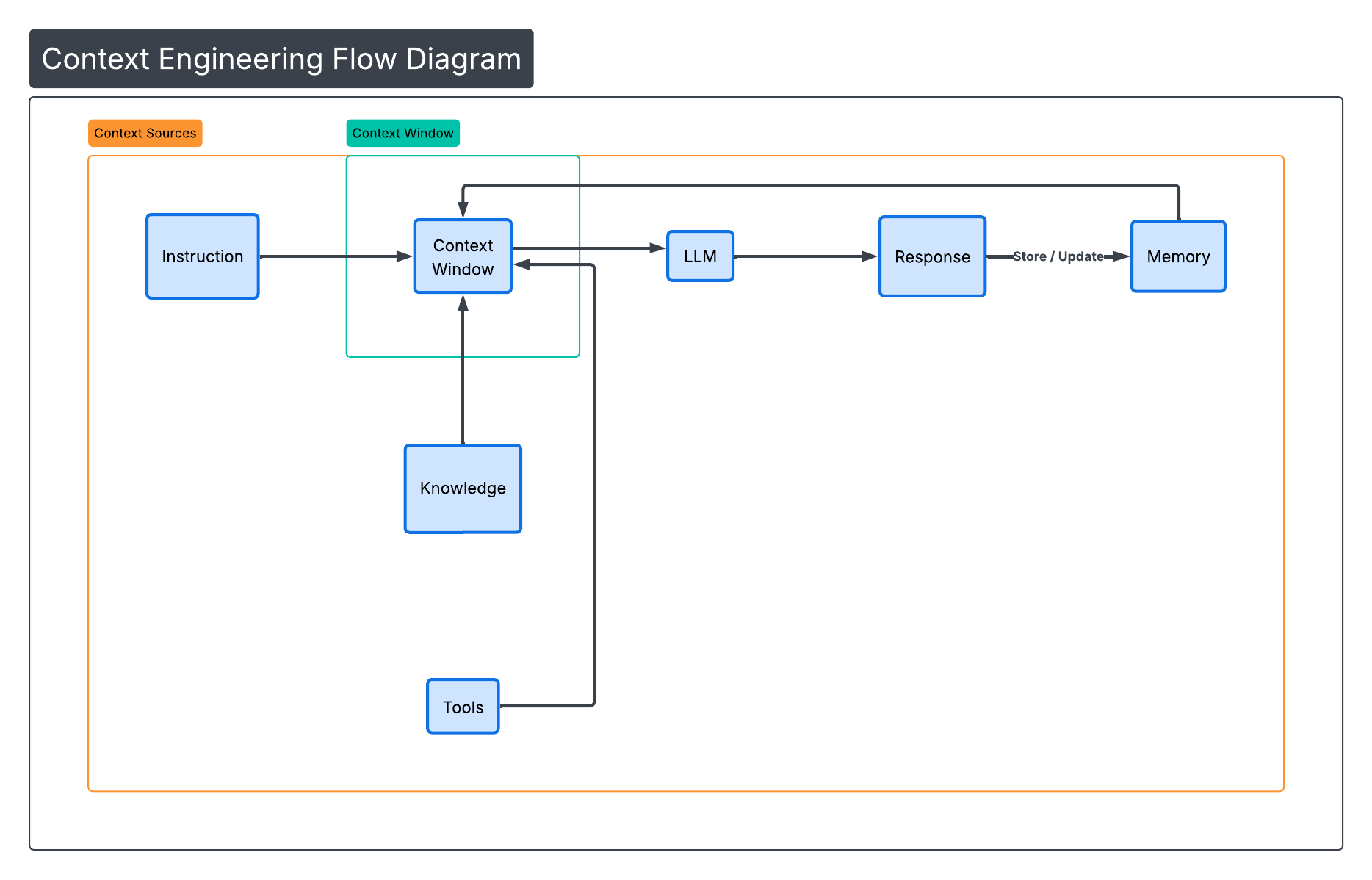 (Figure 1: Context Window Components)
Example Scenario: A Coffee-Making Agent
Imagine we are building a simple coffee-making agent.
The user says:
Make me a cappuccino.
At first glance, this seems simple. But the agent may need to consider:
- Coffee type
- Milk availability
- Machine status
- User preference history
- Mug size
- Temperature preference
- Dietary restrictions
If we dump all of this information into a single prompt, the context window quickly becomes bloated.
Instead, a well-designed system retrieves only what is needed.
That is context engineering.
Common Issues:
When context is poorly managed, systems fail in predictable ways.
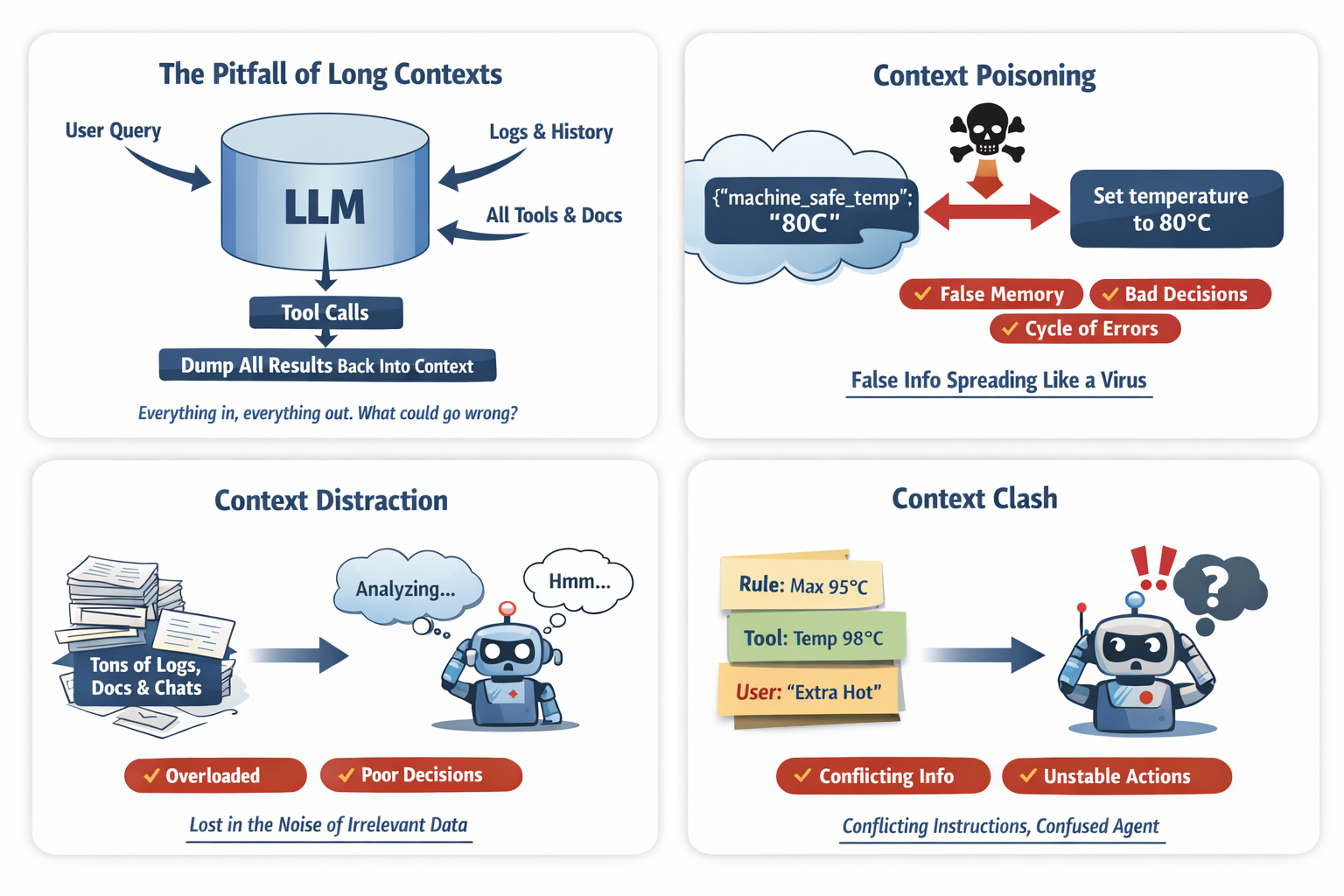 (Figure 2: Common Large Context Window Problems)
Context Poisoning
Context poisoning occurs when incorrect information enters memory and continues to influence future reasoning.
Example:
The user says:
Last time you said the machine overheats above 80°C.
But the correct limit is 95°C.
If the system stores:
{
  "machine_safe_temp": "80C"
}
Future decisions become corrupted.
Context Distraction
Large contexts can cause the model to focus too heavily on irrelevant information.
Example injected context:
- 10K tokens of machine logs
- 5K tokens of recipe history
- 8K tokens of chat history
- 6K tokens of tool metadata
The user says:
Just make it quick.
Instead of executing quickly, the model analyzes logs and historical data.
More context does not mean better reasoning.
Context Confusion
When too much unrelated information exists in the context, the model may generate low-quality responses.
Example context:
- Vegan dietary guide
- Dessert recipes
- Machine repair manual
- Cappuccino instructions
User request:
Make me a cappuccino.
Model response:
Would you like a dairy‑free chocolate drizzle?
The system saw dessert-related context and attempted to be helpful.
Minimal context produces sharper outputs.
Context Clash
Context clash occurs when conflicting instructions appear simultaneously.
Example:
System instruction:
Never exceed 95°C
Tool output:
{
  "recommended_temp": 98
}
Memory:
{
  "user_prefers_extra_hot": true
}
The model now sees three conflicting signals and must guess which one to follow.
With the introduction of tools and Model Context Protocol (MCP) servers, context windows can grow dramatically because tool definitions and schemas are repeatedly injected into prompts unless carefully managed.
Common Context Engineering Techniques
Fortunately, there are several techniques and design strategies that can help manage the context window effectively.
1. RAG (Selective Retrieval)
RAG allows the system to selectively retrieve relevant information instead of injecting entire documents.
Bad:
docs = vector_db.search("cappuccino")
context.append(docs)
Better:
docs = vector_db.search("cappuccino", top_k=3)
filtered = filter_relevant(docs)
context.append(summarize(filtered))
Only inject information that improves reasoning.
2. Tool Loadout
Many systems expose every tool at once. This wastes tokens and creates confusion.
Example tools:
- brew_espresso
- steam_milk
- clean_machine
- repair_machine
- run_diagnostics
If the user wants coffee, only two tools matter.
def tool_loadout(intent):
    if intent == "make_cappuccino":
        return ["brew_espresso", "steam_milk"]
This technique reduces:
- Token waste
- Tool confusion
- Accidental tool usage
3. Context Quarantine
Multi‑agent systems should isolate contexts.
Bad approach:
One shared thread across agents.
Better:
planner_thread = new_thread()
executor_thread = new_thread()

plan = planner_agent.run(input, thread=planner_thread)
result = executor_agent.run(plan, thread=executor_thread)
Isolation prevents:
- Poison propagation
- Instruction contamination
- Context clashes
4. Context Pruning
Remove context that is no longer relevant.
Bad: Keep entire conversation forever.
Good:
def prune_context(context):
    return [
        block for block in context
        if block.relevance_score > 0.6
    ]
Context should be scored for relevance, not blindly retained.
5. Context Summarization/Compaction
Conversation history should be compressed into structured state.
Bad:
User: I like strong coffee.
User: It was cold last time.
User: Use oat milk.
Good:
{
  "strength": "strong",
  "milk": "oat",
  "temperature": "hot"
}
Pseudo code:
def summarize_history(messages):
    return llm.summarize_to_structured_state(messages)
Summaries reduce tokens and increase clarity.
Memory Management is a good example for this technique
Memory should not simply store everything.
Three types are commonly used:
- Short‑term memory – conversation buffers
- Long‑term memory – vector stores or databases
- Structured state memory – key‑value facts
Example:
memory.store("milk_preference", "oat")
memory.store("strength", "strong")
memory.store("temperature", "hot")
When the user says:
Same as yesterday
The agent retrieves structured memory instead of entire chat logs.
6. Context Offloading
Not everything belongs in the LLM. Store data outside the context window.
Examples:
- Databases
- Vector stores
- KV stores
- Object storage
Coffee example:
database.save("machine_logs", logs)
When needed:
temp = tool.get("machine.temperature")
The LLM should not be used as a data storage layer.
Skills capability pattern, a recent popular strategy
Anthropic calls it a progressive declaration where the agent gets needed context, tools, instructions for a specific task.
Claude Skills can be viewed as a context offloading and modular capability pattern, where large instructions, workflows, and resources are stored outside the LLM context and only loaded when needed.
Skills move that information outside the prompt and allow the system to load only the relevant capability at runtime.
So instead of this:
System Prompt:
- How to brew espresso
- How to steam milk
- How to clean machine
- How to repair machine
- How to order supplies
You get this:
skills/
    brew_espresso.md
    steam_milk.md
    clean_machine.md
Then the agent loads only what is needed.
Each skills.md contains:
- name
- description
- instructions
- supporting files
- scripts to execute
Only inject the relevant skill when needed.
Skill Selection Pseudo Code
if intent == "make_cappuccino":
    load_skill("brew_espresso")
    load_skill("steam_milk")s
Instead of bloating context with everything.
Skills reduce:
- Token waste
- Instruction conflicts
- Cognitive overload
7. Token Budgeting (The Overlooked Discipline)
Treat tokens like a financial budget.
MAX_WINDOW = 128000
RESERVE_OUTPUT = 2000

def calculate_budget(current_usage):
    return MAX_WINDOW - current_usage - RESERVE_OUTPUT
Rules:
- Keep active context under 50% of max window.
- Always reserve output tokens.
- Reject requests that exceed safe thresholds.
This is operational governance.
Putting It All Together — Full Coffee Agent
def handle_request(user_input):

    # Step 1: Detect Intent
    intent = detect_intent(user_input)

    # Step 2: Tool Loadout
    tools = tool_loadout(intent)

    # Step 3: Select Skills
    skills = skill_router(intent)

    # Step 4: Structured Memory Retrieval
    memory_state = memory.get_structured()

    # Step 5: Selective RAG
    docs = vector_db.search(intent, top_k=3)
    summarized_docs = summarize(docs)

    # Step 6: Summarize History
    history_summary = summarize_history(conversation)

    # Step 7: Prune
    context_blocks = prune_context([
        skills,
        memory_state,
        summarized_docs,
        history_summary,
        user_input
    ])

    # Step 8: Token Budget Check
    enforce_token_budget(context_blocks)

    # Step 9: Isolated Execution Thread
    executor_thread = new_thread()

    response = llm.generate(
        context=context_blocks,
        tools=tools,
        thread=executor_thread
    )

    return response
Notice what we didn't do:
- No raw logs
- No full database dumps
- No all-tools injection
- No uncontrolled history growth
We curated the context window space.
That is context engineering.
Why This Matters for Agentic Systems
Multi‑agent systems may include:
- Planner agents
- Research agents
- Tool agents
- Validator agents
- Memory agents
If every agent passes full context forward, token usage explodes.
Instead each agent should receive:
- Only task‑relevant state
- Minimal structured memory
- Explicit constraints
- The relevant skill
The Real Shift
Prompt engineering asks:
How should I phrase the instruction?
Context engineering asks:
What information does the model actually need to reason correctly?
This shift separates prototype builders from production architects.
Closing Thought
Prompt engineering writes instructions.
Context engineering designs the workspace where reasoning happens.
And in agentic systems:
The workspace matters more than the sentence.
References and Further Reading
If you’d like to explore how modern AI agents are designed and implemented in production systems, the following resources provide valuable insights from the teams building these technologies:
-
🎥 Agent Design Discussion from Anthropic Engineers
Building More Effective AI Agents
https://www.youtube.com/watch?v=4GiqzUHD5AA -
📄 Anthropic Engineering Blog — Building Effective Agents
https://www.anthropic.com/engineering/building-effective-agents